Transparent Cutout Diffuse
Note. Unity 5 introduced the Standard Shader which replaces this shaderA program that runs on the GPU. More info
See in Glossary.
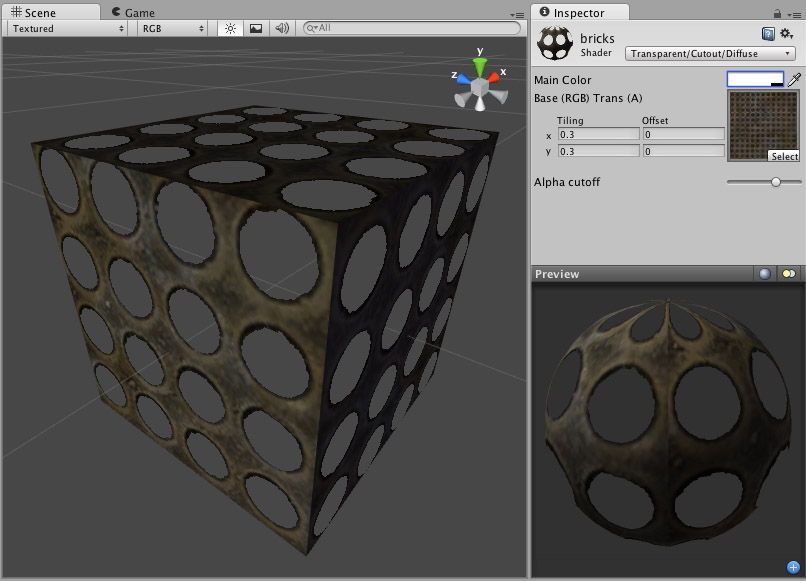
Transparent Cutout Properties
Note. Unity 5 introduced the Standard Shader which replaces this shader.
Cutout shader is an alternative way of displaying transparent objects. Differences between Cutout and regular Transparent shaders are:
- This shader cannot have partially transparent areas. Everything will be either fully opaque or fully transparent.
- Objects using this shader can cast and receive shadows!
- The graphical sorting problems normally associated with Transparent shaders do not occur when using this shader.
This shader uses an alpha channel contained in the Base Texture to determine the transparent areas. If the alpha contains a blend between transparent and opaque areas, you can manually determine the cutoff point for the which areas will be shown. You change this cutoff by adjusting the Alpha Cutoff slider.
TransCutFamilyImport
Diffuse Properties
Diffuse computes a simple (Lambertian) lighting model. The lighting on the surface decreases as the angle between it and the light decreases. The lighting depends only on this angle, and does not change as the cameraA component which creates an image of a particular viewpoint in your scene. The output is either drawn to the screen or captured as a texture. More info
See in Glossary moves or rotates around.
DiffuseSubsetImport
Performance
Generally, this shader is cheap to render. For more details, please view the Shader Peformance page.
TransCutDiffuse